Works on: Windows 10 | Windows 8.1 | Windows 8 | Windows 7 | Windows XP | Windows 2000 | Windows 2003 | Windows 2008 | Windows 98 | Windows ME | Windows NT | Windows Vista | Windows 2012 SHA1 Hash: 5704e8881d1e253597264ad9a6dcff82d8430af3 Size: 19.28 MB File Format: exe
Rating: 2.2
out of 5
based on 23 user ratings
Publisher Website: External Link Downloads: 239 License: Demo / Trial Version
ThinVNC Access Point is a demo software by Thinvnc and works on Windows 10, Windows 8.1, Windows 8, Windows 7, Windows XP, Windows 2000, Windows 2003, Windows 2008, Windows 98, Windows ME, Windows NT, Windows Vista, Windows 2012.
You can download ThinVNC Access Point which is 19.28 MB in size and belongs to the software category Remote Utils. ThinVNC Access Point was released on 2011-06-01 and last updated on our database on 2017-03-10 and is currently at version 2.
Thank you for downloading from SoftPaz! Your download should start any moment now. It would be great if you could rate and share:
Rate this software:
Share in your network:
ThinVNC Access Point Description
ThinVNC Access Point enables secure HTML5 Remote Desktop Access to any PC on the local area network, through a single public IP address.
ThinVNC Access Point is both a HTML5-to-RDP gateway and a ThinVNC bridge, enabling access to any PC with any RDP server configured or ThinVNC installed. Neither end needs additional software installation: just any standard HTML5-compliant Web Browser on the client side and Remote Desktop Service or Terminal Services enabled on the remote PC side.
ThinVNC Access Point uses HTTPS and SSL-WebSockets, allowing for secure access using native firewall-friendly protocols and ports.
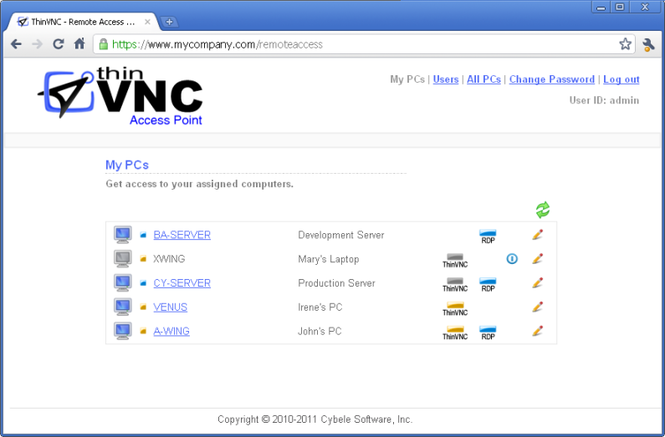
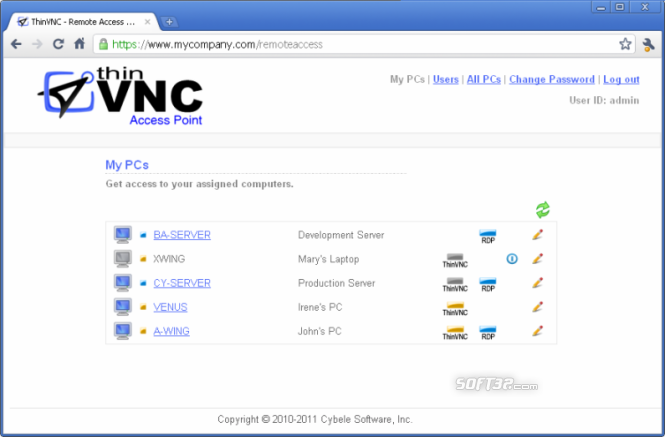
ThinVNC Access Point provides an easy-to-use web interface targeted to both administrators and end-users. Using ThinVNC Access Point, administrators can manage users and assign them PCs. End-users simply see a list with their assigned PCs, showing individual PC state and enabling single-click Remote Desktop access.
ThinVNC Access Point has a built-in Wake-On-LAN (WOL) capability. When the remote PC is powered off, end-users can remotely turn it on by just clicking on its WOL link, making unnecessary to leave all the PCs permanently powered on.
ThinVNC Access Point provides a Remote Installation tool. When ThinVNC is wanted or needed on the remote PC, it can be easily installed from the provided web interface, enabling on-demand remote ThinVNC installation.
Highlights:
* Single access point for Remote Desktop access to any PC in the LAN.
* ThinVNC bridge. Extends ThinVNC to allow access through just one public ip address.
* HTML5-to-RDP gateway. Allows for accessing any Windows PC or RDP server from a HTML5-compliant web browser.
* Secure (HTTPS / WebSockets+SSL) firewall-friendly access point
* Web user interface for users and PCs administration
* Windows Logon Support.
* Remote Installation Tool allows for easy ThinVNC setup on a remote PC.
* Wake-On-Lan (WOL)
Visit us at: www . thinvnc . com
Where to buy?
Last updated price and discount information 9 years agoupdate now



 Windows NT and above
 View Screenshots(2)
 Comments
 Download





 Similar Software


 Recently Searched
 Software Categories
 Trending Software


 Like Us

