


 Windows 7 and above
| Rate this software: | |
| 1483 downloads | |
 View Screenshots(1)
 Comments
 Download




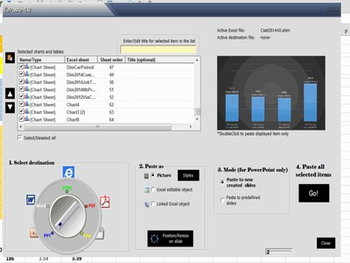
Main features:Two operating modes: batch pasting of unlimited charts/tables or swift pasting of the current selection in ExcelAutomatic identification of embedded charts, charts-sheets and named rangesComplete control over what to paste and in which orderComplete control over the pasting format (Picture/Excel editable/Linked)Automatic update and refresh of linked charts and tables in PowerPointTwo operating modes while pasting to PowerPoint (to new slides automatically added or to predefined slides number)Complete control over the positioning/sizing of the pasted objects on the PowerPoint slideTitles may be added directly from EzPasteBuilt-in utility for creating and editing data-range objects to be pasted as named tablesYou may apply attractive visual effects (reflection, shadow...) to the pasted objectsAll the EzPaste settings of a specific Excel file are saved within the file and automatically available once the file is reopenedAll EzPaste features accessible easily from a new tab added to ExcelFull support by e-mail.
Whats new in this version:
Version 4.0: New Ribbon in Excel; New installer; Export to image files; Update linked of charts or tables; Create automatically Outlook e-mails from Excel; Improved interface.

| $123 | Click the link to buy | Buy |
 Similar Software


 Recently Searched
 Software Categories
 Trending Software

 Like Us

Free Windows software, games, themes and wallpapers with direct download links since 2011.

